
iTunes
AppleVideo Players & Editors
4.728.00M Reviews
- Version
- Varies With Device
- Installs
- 10.00B
- Age Rating
- Everyone
Screenshots
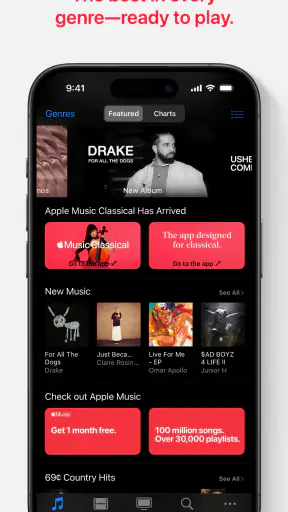
Our Review of iTunes
 Analysis by Appyee
If I’m deciding whether to use iTunes today, I start with a practical question: do I want one Apple-centered place to manage music and other media, or do I mainly want a quick player that works the same way across every device? That distinction matters. iTunes is a free media app from Apple, released in 2010, and its long life shows in the way it brings library management and playback together. It has a 4.7 average from around 130 million ratings, with more than 10 billion installs, but scale alone does not make it the right fit for everyone.
Where a connection changes the experience
In everyday use, network access matters most when I’m browsing for something I don’t already have organized or when I’m exploring the store. Searching a large catalog feels different from opening a familiar album: the first depends on reaching online content, while the second is mainly about finding my way around my own library. I treat those as two separate jobs rather than assuming every part of the experience behaves the same way.
That distinction helps me plan. If I’m choosing music for a long trip, I sort out what I want to listen to before leaving rather than waiting until I’m on a weak connection to browse. I also avoid relying on a last-minute search when I need something specific. It is a small habit, but it prevents a network delay from becoming the main event.
Using it between home, work, and travel
iTunes makes most sense to me when my media life already has an Apple-shaped center. At home, I can take time to organize a collection; later, on a phone, the useful question is whether I can get to the album or video I meant to open without fuss. Keeping names and playlists tidy before I’m in a hurry pays off more than trying to fix a messy library while walking out the door.
For a realistic weekday example, I might choose a few albums in the morning, make a playlist for the commute, and use search to jump to a particular artist when plans change. That is a better fit for a planned listening routine than for someone who wants every session to begin with spontaneous discovery. If I’m moving between devices, I would also check that the library organization I care about is in place before depending on it away from home.
When something takes longer than expected
A slow response can come from more than one place: a large library can take time to navigate, and online browsing can feel less immediate when the connection is poor. I find it useful to narrow a search with an artist or album name instead of repeatedly scrolling through broad results. If a page does not load as expected, I pause and retry once the connection is steadier rather than tapping through several screens and losing track of where I was.
This is also where iTunes can feel less forgiving than a lightweight player. A simple playback app may be quicker when all I want is to open a file and press play, while iTunes asks me to think in terms of a managed media collection. That extra structure is useful when it saves future searching; it is friction when I only need a one-off listen.
Keeping browsing deliberate
If I’m watching data use, I separate library housekeeping from casual browsing. I can organize playlists and decide what I want to look for while connected to a reliable network, then keep my next listening session focused instead of wandering through store pages. I also try not to treat every recommendation as a reason to browse further; a short, intentional search is easier to manage than an open-ended session.
My practical tip is to make a small “next up” playlist when I have a moment, rather than building one from scratch during a commute. It gives me a clear starting point and reduces the need to search repeatedly. The trade-off is that a planned queue may feel less fresh than choosing each track as I go, so I use it when convenience matters more than discovery.
Who benefits from this kind of media hub
I’d point a listener with an established Apple collection toward iTunes first, especially if they value organizing albums, playlists, and other media in one familiar environment. The app is also a reasonable choice for someone who wants to browse and manage purchases as part of a broader library routine. Its free price removes an upfront cost, and its Everyone age rating makes it broadly accessible.
I’d steer a person in another direction if their main priority is a minimal player, a platform-neutral library, or a workflow built around services and devices outside Apple’s ecosystem. Dedicated players can be more direct for local files, while other media apps may suit people who want discovery or playback to be the whole experience. I would choose based on where my collection lives, not just on which interface looks familiar.
The Ultimate Music Management Experience
When it comes to organizing your music library, iTunes really knows how to hit the right notes. Whether you're a casual listener or a serious audiophile, the app provides an intuitive interface that makes managing your tunes a breeze. I remember the first time I synced my iPhone with iTunes. It was like finding a long-lost friend who just “gets” me.
The app allows you to create playlists, sort music by genre, artist, or album, and even rate your favorite songs. It’s like having a personal DJ at your fingertips. And let’s talk about the iTunes Store! With millions of songs to choose from, it’s easy to lose track of time browsing through the endless options.
Seamless Integration with Apple Devices
If you’re part of the Apple ecosystem, you’ll appreciate how well iTunes integrates with other Apple devices. Syncing data between my iPhone, iPad, and MacBook has never been easier. It’s like having a symphony of devices all playing in harmony.
And for those of us who love podcasts, audiobooks, and even movies, iTunes has got you covered. The app offers a one-stop-shop for all your media needs. I especially enjoy how easy it is to switch between different types of media without missing a beat.
Discover New Music Effortlessly
One of my favorite features of iTunes is its ability to recommend new music based on my listening habits. It’s like having a friend who knows exactly what you want to hear, even before you do. The “For You” section is particularly useful, offering curated playlists and albums tailored to my tastes.
Plus, the genius mixes are a godsend for those indecisive moments when I just don’t know what to listen to. It’s like magic, and I can’t get enough of it!
A Few Notes on Design and Usability
Now, let’s talk about the app’s design. iTunes has a clean, modern interface that’s easy on the eyes. Navigating through the app is smooth, and everything is laid out in a way that just makes sense. However, if I’m being honest, the app can feel a bit sluggish at times, especially when dealing with large libraries. But hey, nobody’s perfect, right?
The search function is another area where the app shines. It’s quick and efficient, allowing you to find exactly what you’re looking for in seconds. Whether it’s a specific song, artist, or playlist, you’re just a few taps away from your next favorite tune.
Final Thoughts
All in all, iTunes is a fantastic app for anyone looking to manage their music and media libraries effectively. It offers a plethora of features that cater to both casual listeners and hardcore music enthusiasts. While it might not be perfect, its strengths far outweigh its weaknesses, making it a must-have app for any music lover.
If you’re still on the fence about giving iTunes a try, I’d say go for it. You might just find yourself pleasantly surprised by what it has to offer. After all, music is meant to be enjoyed, and this app certainly knows how to deliver on that promise.
How I’d choose between it and other players
For me, the useful comparison is not simply “which app has more music?” It is whether I want a media organizer or a fast, uncomplicated playback tool. iTunes earns its place when I care about keeping artists, albums, ratings, playlists, and different kinds of media in a coherent library. A basic player can be less demanding when I already know which file I want and have no interest in catalog browsing or collection upkeep.
There is a genuine trade-off in that broader approach. A library with careful labels and playlists becomes easier to revisit, but it also asks for some attention up front. If my collection is small or changes constantly, that organizing work may not repay itself. If I have a long-running collection and like returning to albums rather than picking isolated tracks, the structure becomes more valuable over time.
Small habits that make the library easier to use
I get more out of the app when I make organization useful rather than perfectionist. Instead of creating a playlist for every mood, I keep a few that solve real situations: familiar favorites, background listening, or music I want to revisit. A rating is most helpful when I use it consistently, not when I rate everything in one sitting and forget what the scale means to me.
Search works best when I remember that a specific clue is usually quicker than browsing categories. If I know the artist but not the album, I start with the artist; if I remember a title fragment, I try that before scrolling through a long list. These small choices matter more with a large library, where the app’s breadth can otherwise turn a simple task into a hunt.
I also wouldn’t build my whole routine around recommendations. The personalized suggestions and mixes can be a pleasant way to break out of a listening rut, but I treat them as a starting point, not a guarantee that every pick will fit the moment. When I want something dependable, a playlist I made myself is easier to control; when I want a surprise, recommendations have more room to help.
What to expect when moving between devices
Apple-device integration is a strong reason to consider iTunes, but I’d still be deliberate about how I organize media before switching screens. A consistent naming and playlist habit makes it easier to recognize the same collection wherever I use it. I would not assume that a change of device automatically resolves a cluttered library; good organization remains the user’s job, and that is a worthwhile expectation to set early.
People often ask whether this is the best choice for someone who uses a mix of platforms. My answer is conditional: if the Apple devices are where the collection is managed and played most often, the connection can feel natural. If I need the same workflow to be equally central on unrelated platforms, I’d compare a service or player designed around that mixed setup before committing my habits to one ecosystem.
Another practical question is whether it suits video as well as music. Its role as a media hub makes it relevant to people who keep both kinds of content in their routine, and switching between media types is part of its appeal. Still, someone who mainly watches video may prefer a player built specifically around video controls and a simpler viewing-first layout. I would choose according to the media I handle most, rather than expecting one app to be the ideal tool for every format and task.
When the connection is the weak link
If browsing or loading feels slow, I first separate a network-dependent task from ordinary library navigation. There is little value in repeatedly refreshing a store search when the connection is unstable; I can leave that task for later and use the time to tidy a playlist or choose from material already visible in my library. That way, a temporary delay does not make the whole app feel unusable.
For a longer journey, I prepare before I leave: choose the listening plan, confirm the items I expect to use are available in the way my setup supports, and avoid depending on last-second catalog exploration. I’m careful not to treat that as a promise that every item will be available in every circumstance. The useful point is simply that planned choices are less vulnerable to a weak connection than spontaneous browsing.
My connectivity verdict is that iTunes works best when online discovery and a maintained personal library complement each other, rather than when I expect uninterrupted browsing everywhere. The connection can open up the exploratory side, while thoughtful organization makes familiar listening more direct. If that balance sounds appealing, it is a capable, free Apple media app; if I want a platform-neutral player with no library-management overhead, I’d look elsewhere.
How iTunes Compares
Full ComparisonChoose Google TV for discovering movies and shows across services, iTunes for Apple-centered media and music, or BiliBili for anime and community features.
| App | Developer | Rating | Price |
|---|---|---|---|
 Google TV | Google LLC | 3.9 | Free |
 iTunesThis App | Apple | 4.7 | Free |
 BiliBili -HD Anime, Videos | BALABOOM PTE. LTD. | 3.7 | Free |
Verdict
Strengths of iTunes
- Extensive music library available.
- High-quality audio streaming.
- Seamless integration with Apple devices.
- User-friendly interface design.
- Regular updates and new features.
Limitations of iTunes
- Limited Android support.
- Requires Apple ID for access.
- Subscription cost can be high.
- Occasional sync issues.
- Heavy app size on device storage.
Other Releases by Apple
View All
Apple TV: Shows, Movies & More
Entertainment4.1

Apple Music
Music & Audio4.5

Move to iOS
Tools3.6

Apple TV: Shows, Movies & More
Entertainment4.5
Similar Picks in This Category
View All
Google TV
Google LLC3.9

YouTube
Google LLC3.8

MX Player
Amazon Mobile LLC4.2

CapCut - Video Editor
Bytedance Pte. Ltd.3.5

PLAYit-All in One Video Player
PLAYIT TECHNOLOGY PTE. LTD.4.5

VivaVideo - Video Cut & Editor
QuVideo Inc. Video Editor & Video Maker App4.3
You May Also Like
View All

Frequently Asked Questions
What is iTunes, and what are its main features?
iTunes is a media player, media library, and online store application developed by Apple. It allows users to purchase, download, and organize digital multimedia on personal computers running the macOS and Windows operating systems. Key features include music and movie purchases, playlist creation, and synchronization with Apple devices.
Is iTunes compatible with non-Apple devices?
iTunes is primarily designed for use with Apple devices, such as iPhones, iPads, and iPods. However, it is also available for Windows PCs, allowing users to manage and play their media on non-Apple computers. Direct synchronization with non-Apple devices is not supported, but media files can be transferred manually.
How does iTunes Store work for purchasing content?
The iTunes Store allows users to purchase and download a wide range of digital content, including music, movies, and TV shows. Users need an Apple ID to make purchases, which can be paid for using a credit card, debit card, or Apple gift card. Content can be downloaded directly to your device for offline access.
Can I share my iTunes content with family members?
Yes, iTunes supports Family Sharing, which allows up to six family members to share purchases made from the iTunes Store, App Store, and Apple Books. Family members can also share a family calendar, photos, and more. This feature requires setting up a Family Sharing account with an Apple ID.
What are the system requirements for using iTunes?
For macOS users, iTunes is included in the operating system up to macOS Mojave. For Windows users, iTunes requires a PC with a 1GHz Intel or AMD processor, 512MB of RAM, and a compatible graphics card. A broadband internet connection is recommended for accessing the iTunes Store and streaming content.
